Saturday, September 16, 2023

Find Your Correct Age From Date of Birth

First of all click on First two digits to type Month number from keyboard like any number from 1 to 12. . Now click on next two digits and type day number of month that is date from 1 to 31. In the last step type the year of your birth in four digits like 1995. 
Now click on the blue button with text "Calculate Age". Your accurate age will be displayed below the button. For example. If today is 09-16-2023 that is September 16, 2023 and you type birth date as 11-01-2000 that is November 1, 2000, your accurate age will be displayed as:Your age is 22 years, 10 months, and 15 days.
Age Calculator
Calculate Your Age in Years, Months and Days

Age Calculator

Calculate Your Age Now!

As shown in the image below:
Find your Accurate Age using your birth date


Thursday, October 8, 2020

Convert Centimeters to Inches Python Programming | Python Program Conver...

YouTube Video Tutorial How to write a Python program to convert centimetres to inches

Formula to convert centimetres to inches


Explanation of this Python Program

This Python program prompts the user to enter a height in inches, converts it to centimeters, and then prints the converted value. It uses the conversion factor of 2.54 to perform the conversion and rounds the result to two decimal places before displaying it to the user.

Here's an explanation of the provided Python program line by line:

python
inches = float(input('Enter the Height in inches to convert into centimeters:'))
  • This line prompts the user to enter a height in inches and assigns the entered value to the variable inches.
  • The input() function is used to receive input from the user, and float() is used to convert the input into a floating-point number.
python
centimeters = inches * 2.54
  • This line calculates the equivalent value in centimeters by multiplying the inches variable by the conversion factor 2.54.
  • The result is assigned to the variable centimeters.
python
centimeters = round(centimeters, 2)
  • This line rounds the value in centimeters to two decimal places using the round() function.
  • The rounded value is then assigned back to the centimeters variable.
python
print(inches, 'Inches =', centimeters, 'Centimeters')
  • This line displays the result of the conversion to the user.
  • The print() function is used to output a formatted string that includes the original inches value, the equal sign, and the converted centimeters value.


Thursday, April 30, 2020

Use Microsoft Excel Online [ 2020 ] Free Spreadsheet

Topic: Use Microsoft Excel Online Free Spreadsheet

How To Create Excel Worksheet Online Free

Don't worry if you are to prepare a worksheet in Microsoft Excel and you have not purchased Microsoft Office software. You can use free online version of Microsoft Excel Online and create
worksheets as you like. Following are the instructions on how to use Microsoft Excel Online.

Use Microsoft Excel Online Free Spreadsheet


Here are the easy steps to create  power calculator worksheet using Microsoft Excel Online free.

1. for this purpose you need to have a Microsoft Account.

2. Type  or copy paste the following address in your web

browser's address bar
https://office.live.com/start/excel.aspx

Login To Your Microsoft Account. If you are not using any Microsoft account, please create an account now. 

3. Login to your Microsoft account ( like abc@hotmail.com or xyz@hotmail.com) or read this post to Create a new Microsoft account in easy steps.

Create Excel Workbook Online


Chose your Microsoft account


Select New Blank Workbook

4. Click on the New Blank Workbook option.

5. A blank Workbook will open. The worksheet named 'sheet1' is here to use for entring and processing your data.

Develop Power Calculator in Excel Online


6. Let's create a simple Power calculator worksheet.

7. Enter the sample data and apply some formatting as shown in the figure. Apply Merge and Center Option on the heading.

Enter Sample Data in Excel Worksheet Online


8. similarly, you can apply font color and fill color options as shown in the figure while selecting the text.
Enter Sample Data in Excel Worksheet Online

Insert a Function Power(number, power/exponent) in the required cell of the excel worksheet

9. This worksheet will use the function power(b3,c3) to calculate power of a number. The first number is in cell b3. the first power or exponent is in the cell C3.

Apply formula / Insert Function in Excel Online


10. After inserting the function in the cell D3, press Enter.

11. the result will be shown in the cell.

Copy the Formula Downwards in Excel Sheet


12. Now copy the formula by taking the mouse pointer to bottom right corner of the cell containing the formula. When a + sign appears, click left mouse button and drag down for the cells to copy formula. Note that you must keep the left mouse button pressed as long as you drag down.

How to copy formula in Excel Online


Save Excel worksheet / Workbook Online


13. Now click on nine dot button from top left corner and save the excel workbook. This workbook will bbe saved inOneDrive online storage provided free by Microsoft.

How to save Workbook in Excel Online

Download Excel worksheet / workbook to your computer


14. You can rename the workbook or download your workbook in your own computer. For this purpose use the nine dot button and the options as shown in the figure.

How to Download Workbook from Excel Online

Tuesday, April 14, 2020

Introduction to Algorithms and Algorithmic Notation With Examples

Topic: Introduction to Algorithm and Algorithmic Notation With Examples

What is an Algorithm?


The step by step procedure to solve a particular problem is called an Algorithm.  A Good Programmer always writes algorithms before developing programs.
Algorithmic Notation with example algorithms 2020
Algorithmic Notation with example algorithms 


Advantages of  writing an Algorithm


  • The process of solving a problem becomes simpler and easier with the help of  algorithm.
  • There are less chance of errors in the program, if we design algorithms before writing our programs in any programming language.
  • We can convert an algorithm into a program of any programming language.
  • It is not dependent on any programming language. Therefore it is easy to understand for anyone even without programming knowledge.

What is the Relationship between an Algorithm and a Program


Sponsored Links

An algorithm is the sequenc of steps to perform a task, whereas a program is the set of statements to perform a specific task. Normally, we will use a programming statement (instruction of a programming language) for each step of an algorithm.

For example, consider the following four steps of an algorithm of a program to find square of a number:
  1. Print "Enter a number:"
  2. Input a number in n.
  3. Calculate square = n * n
  4. Print "Square=",square
Now we will write the program instructions for the above steps of the algorithm:

1. printf("Enter a number:");
2. scanf("%d",n);
3. square = n * n;
4. printf("Square=%d",square); 

Introduction to Algorithmic Notation

The algorithms are written using an algorithmic noataion. Normally there is no standard algorithmic otation. Every author uses his own set of algorithmic statements to design the algorithms.
Introduction to Algorithms and Algorithmic Notation With Examples


For example, we will use the following set of statements as algorithmic notation to design the algorithms:

The Name of Algorithm

First of  all we will write the name of the algorithm for example:
Algorithm square.

The Description of Algorithm

Here we will describe the purpose of the algorithm.
For example:
// This algorithm is used to input a number and display its square.

The Comments

The comments are used to explain the purpose of  a step of an algorithm. For example:
// Compute square of the number n
   square = n * n
We will use double slash // to start a single line comment.

The Variables

A variable is an entity whose value can be changed. It is used to store data. We do not need to declare variables. We simply use variables in an algorithm according to the requirements. We will use simple variable names in small letters. For example, n or num1, num2, square, factorial, first_name etc.

The Statements

There are differnt statements in an algorithmic notation to perform differnt tasks.

Input Statement

Inmput statement is used to input data into different variables.
For example:
Input a number in n.
Or more precisely
Input n
Input radius of circle in rad.
Note: rad is a variable to store the value of the radius of the circle.
Or more precisely,
Input rad

Output statement

The output statement is used to display string messages and the values of variables:
For example:
Print "Enter a number"
or
Print "Sum=",sum

Assignment statement

Assignment statement is used to assign a value to a variable or to calculate a formula. For example,
i = 1
or
sum = num1 + num2

If statement

If statement is used to decide the execution of a statement or a set of statements if the given condition is true.
For example:
If (num1 == num2)
   Print "both numbers are equal"
End If

If Else Statement

If else statement is a two way selection. If condition is true, the if block is executed otherwise, the else block of statements is executed:
If (num1 ==  num2)
   Print "both numbers are equal"
Else
   Print "numbers are different"
End If

Repeat - For

A Repeat - for construct is a looping statement. It is used to execute a block of one or more statements repeatedly for a fixed number of times. For example: the following for statement print 1 to 5 numbers.
Step 1. Repeat steps 1.1 For i = 1 to 5 step 1
                    Step 1.1 Print i
            End For

Repeat - While

A Repeat - While statement is used to execute a block of one or more statements as long as the given condition remains true. For example: Input a number, and sum it as long as we enter a number gretare than zero.


Step 1. sum = 0

Step 2. Print "Enter a number:"

Step 3. Input n

Step 3. Repeat Step 3.1,3.2,3.3 While ( n > 0)

               Step 3.1  sum = sum + n

               Step 3.2  Print "Enter a number:"

               Step 3.3  Input n

End While

Step 4. Print "Sum=",sum

Algorithm to Add Two Numbers

Algorithm Sum
//This algorithm inputs two numbers and display their sum.
// It uses three integer variables num1, num2 and sum.
Step 1.  Start
Step 2.  Print "Enter two numbers to Add="
Step 3.  Input num1, num2
step  4.  Calculate sum = num1 + num2
Step 5.  Print "Sum=", sum
Step 6.  End 


Algorithm to Check whether Two Numbers are Equal

Algorithm Check_Equal
//This algorithm inputs two numbers and display if they are equal or not
// It uses two integer variables num1, num2
Step 1.  Start
Step 2.  Print "Enter two numbers to Add="
Step 3.  Input num1, num2
step  4.  If ( num1 == num2 )
                 Print "Both numbers are equal"
            Else
                 Print "Both numbers are different"
            End If
Step 5. End 

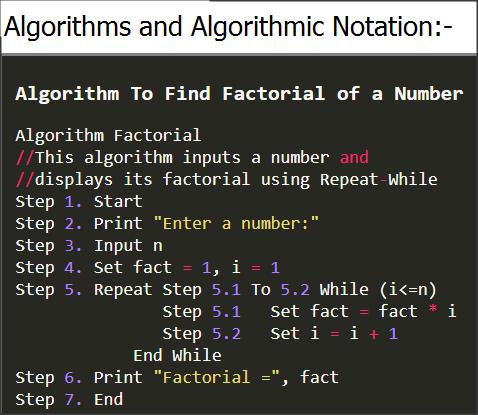
Algorithm To Find Factorial of a Number

Algorithm Factorial
//This algorithm inputs a number and displays its factorial using Repeat-While
Step 1. Start
Step 2. Print "Enter a number:"
Step 3. Input n
Step 4. Set fact = 1, i = 1
Step 5. Repeat Step 5.1 To 5.2 While (i<=n)
               Step 5.1   Set fact = fact * i
               Step 5.2   Set i = i + 1
            End While
Step 6. Print "Factorial =", fact
Step 7. End

Algorithms, Algorithmic Notation and Problem Solving

We have discussed the following concepts in this Algorithms and Algorithmic Notation tutorial:
Algorithms, Importance of Algorithm, Notation used to describe algorithms and some important examples of algorithms.

Saturday, June 1, 2019

Converting Decimal Number system to Binary, Octal and Hexa Decimal with Examples and Vice Versa


Topics covered with examples: Converting Decimal Number system to Binary, Octal and Hexa Decimal with Examples and Vice Versa


Number Systems in Computer Science and Conversion Method
Conversion of Decimal number system to other  number systems
Conversion of Decimal number system to binary number systems
Conversion of Decimal number system to octal number systems
Conversion of Decimal number system to hexadecimal number systems
Conversion of  non-decimal Number system to Other non-decimal number system

Conversion of other number systems to Decimal number system
Conversion of binary number systems to Decimal number system
Conversion of octal number systems to Decimal number system
Conversion of  hexadecimal number systems to Decimal number system

Q1. What is a Number System? What are different types of number system?

Number system
A number system is a set of digits, symbols and rules to express quantities in counting and calculations. Following are the most commonly used number systems:


Converting Decimal Number system to binary, octal and hex decimal with examples and vice versa
Number-systems-in-computer-science-easy-conversion-methods-with-pictures

Decimal Number System

It is most commonly used number system. It has 10 symbols{0,1,2,3,4,5,6,7,8,9}. It is also called base 10 number system. People normally use decimal number system to represent numbers.


Binary Number System

In binary number system there are only two symbols {0 and 1}. In a computer all data is represented by Binary number system. This is because computer’s electronic switches have only two states on and OFF. When a switch is ON it represents a 1 and when a switch is OFF, it represents a Zero.

Octal Number System

Octal number system consists of 8 digits{0,1,2,3,4,5,6,7}. Its base is 8. It is used as shorthand for long binary numbers. Each octal digit represents 3 binary digits.

Octal
Binary
0
000
1
001
2
010
3
011
4
100
5
101
6
110
7
111


Hexadecimal Number System

Hexadecimal number system is used to represent long binary numbers in an easy and short form. Its base is 16. It has sixteen symbols{0,1,2,3,4,5,6,7,8,9,A,B,C,D,E,F}. Each hexadecimal digit represents 4 binary digits.
Hexadecimal
Binary
Hexadecimal
Binary
0
0000
8
1000
1
0001
9
1001
2
0010
A
1010
3
0011
B
1011
4
0100
C
1100
5
0101
D
1101
6
0110
E
1110
7
0111
F
1111


Q2. Conversion of Decimal (Integer part) to other systems

                                  
a) 4510 = (?)2   
b) 11910 =(?)8
c) 19010 =(?)16
2
45
2
22-1
2
11-0
2
5  -1
2
2  -1
2
1  -0

0  -1 
8
119
8
14-7
8
1  -6

0  -1
16
190
16
11-14(E)

0  -11(B)


=> 4510 = (101101)2                          11910=(167)8                       19010=(BE)16                       


Q3. Conversion of Decimal system (Fraction part) to other systems

a) (.23)10   = (?)2
b) (.225)10 = (?)8
c) (.225)10 = (?)16


Fraction
Integer
.23 X 2 = 0.46
.46
0
.46 X 2 = 0.92
.92
0
.92 X 2 = 1.84
.84
1
.84 X 2 = 1.68
.68
1
.68 X 2 = 1.36
.36
1

=> (.23)10   = (.00111)2        [Similar method is used for decimal (fraction) to Octal (multiply by 8)and hexadecimal(multiply by 16)]

Q4. Conversion of Other systems (Integer part) to Decimal


a)  (101101)2    =( ? )10     b)    (167)8  = (?)10                 (BE)16 =(?)10                      
   
  a) (101101)2                                                   
     =1x25+0x24+1x23+1x22+0x21+1x20 
    = 32   + 0   +   8   +  4   + 0     +1
    = 45 
b) (167)8          
     =1x82+6x81+7x80 
    = 64   + 48   +  7
    = 119 
c) (BE)2            
     =Bx161+Ex160 
    =  11x161+14x160 
    =  176   + 14
    =   190 


Q5. Conversion of Other systems(Fraction part) to Decimal number system

a)  (.110)2    =( ? )10     b)    (.75)8  = (?)10                 (.13)16 =(?)10                       
   
  a) (.110)2                                                        
     =.{1x2-1+1x2-2+0x2-3} 
     =.{ 1/2   + 1/4   +   0}
     =.{  .5    +  .25  +    0}
     =.75
b) (.75)8            
     =.{7x8-1+5x8-2  }
     =.{ 7/8   + 5/64 }
     = .{.875 + .0781}
     = .9531 
c) (.13)16           
     =.{1x16-1+3x16-2  }
     =.{1/16   +3/256} 
    =  .{.0625   + .01171}
    =   .0742 


      Conversion of  non-decimal Number system to Other non-decimal number system


      For example to convert OCTAL into HEXADECIMAL, use the follwing steps:

1)            Convert octal into decimal

2)            Convert decimal into hexadecimal

Topics covered with examples: Number Systems in Computer Science and Conversion Method

Conversion of Decimal number system to other  number systems

Conversion of Decimal number system to binary number systems
Conversion of Decimal number system to octal number systems
Conversion of Decimal number system to hexadecimal number systems
Conversion of  non-decimal Number system to Other non-decimal number system

Conversion of other number systems to Decimal number system
Conversion of binary number systems to Decimal number system
Conversion of octal number systems to Decimal number system
Conversion of  hexadecimal number systems to Decimal number system


Find Your Correct Age From Date of Birth

First of all click on First two digits to type Month number from keyboard like any number from 1 to 12. . Now click on next two digits and t...